Everything you need to design a page. Nothing your visitors pay for.

A full visual builder inside the EmDash admin: 96 modules, per-device styling, behavior without code, built-in testing and analytics, and pages that ship only the code they use.

Edit on the page, not in a form.

Click any element to style it, double-click text to type, right-click for everything else. Search the module panel and drop in what you need.

  • Sections, rows, columns, modules and nestable Groups
  • 27 column structures plus custom CSS grids
  • Command Center (⌘K), Layers panel and Find & Replace
  • Unlimited undo, a history timeline and saved revisions
  • Copy and paste elements or just their styles
  • Presets, global colors, global fonts and Site Styles
yoursite.com/_emdash/admin

Changes show up as you make them.

Drag any number to scrub it, type a hex value, or pick from your global colors. The canvas updates on every move, and one undo puts it back.

Feel the workflow.

A small taste in your browser: drag layers to reorder, add sections from the palette, remove what you don't need.

Home pageDrag layers to reorder
  • Hero
  • Features
  • Call to action

Handmade ceramics for slow mornings

Small-batch stoneware, fired in Portland.

Shop the collection

Lead-free glazes

Dishwasher safe

Ships in 3 days

Join the studio newsletter

Subscribe

96 modules in seven families.

Every module shares the same styling controls, so once you learn one you know them all. Star your favorites and they appear first. Wrap any set of modules in a Group to lay them out with flex or grid.

Basic

33

Copy, calls to action, data and the building blocks every page needs.

  • Text
  • Heading
  • Button
  • Blurb
  • Call To Action
  • Divider
  • Icon
  • Icon List
  • Pricing Tables
  • Code
  • Data Table
  • Star Rating
  • Alert Box
  • Business Hours
  • Price List
  • Timeline
  • Animated Heading
  • Dual Button
  • Scrolling Marquee
  • Chart
  • Badge
  • Avatar Group
  • Card
  • Code Block
  • Text Divider
  • Shapes
  • Step Flow
  • How-To
  • Text On A Path
  • Expanding CTA
  • Reading Progress Bar
  • Text Effects
  • Cookie Settings

Media

19

Images, video, maps, mockups and motion.

  • Image
  • Gallery
  • Video
  • Audio
  • Map
  • Before / After
  • Video Slider
  • Lottie
  • Image Hotspots
  • Logo Carousel
  • Video Popup
  • Image Accordion
  • Logo Grid
  • Image Magnifier
  • Panorama
  • Scroll Image
  • Device Mockup
  • SVG Draw
  • Tile Scroll

Interactive

20

Content that reveals, counts, slides and responds.

  • Accordion
  • Toggle
  • Tabs
  • Slider
  • Number Counter
  • Circle Counter
  • Bar Counters
  • Countdown Timer
  • Table Of Contents
  • FAQ
  • Flip Box
  • Content Toggle
  • Modal Popup
  • Tooltip
  • Hover Card
  • Drawer
  • Progress
  • Hover Box
  • Info Circle
  • 3D Cube Slider

Dynamic content

15

Pull live EmDash entries, menus and comments into any layout.

  • Blog
  • Post Slider
  • Portfolio
  • Menu
  • Post Title
  • Post Content
  • Comments
  • Sidebar
  • Post Navigation
  • Breadcrumbs
  • Login
  • Post Carousel
  • Entry Calendar
  • News Ticker
  • Blog Timeline

Forms

3

Collect leads and messages without another plugin.

  • Contact Form
  • Email Opt-in
  • Search

Social

5

People, proof and sharing.

  • Person
  • Testimonial
  • Social Follow
  • Social Share
  • Testimonial Slider

Fullwidth

1

Edge-to-edge headers.

  • Fullwidth Header
yoursite.com/_emdash/admin

Three breakpoints, one layout.

Press 1, 2 or 3 to preview desktop, tablet or phone, then change any value for that screen only. Hover values work the same way. Hide elements per device when a layout needs it.

Design controls that go all the way down.

Layered backgrounds

Color, gradient, image, video, 23 patterns and 22 masks, stacked on any element. Linear, circular, elliptical and conic gradients, saved as reusable gradient variables.

CSS Grid editor

Drag items across tracks, resize gaps and columns on the canvas, and add offset rules like every third item or the first item, with their own tablet and phone overrides.

Skeleton loading

Shimmering placeholders traced from the real layout, one bar per line of text. Reveal together, in sequence or as a sweep, and respect reduced motion.

  • Gradient text, image-filled text and text strokes
  • Scroll effects: move, fade, scale, rotate and blur
  • 11 section-divider shapes, top and bottom
  • Sticky, absolute and fixed positioning
  • Hover values for colors, borders, shadows and spacing
  • Custom CSS, attributes, classes and IDs per element

Interactions and conditions, written as sentences.

When a visitor clicks, hovers, scrolls into view, opens the page or resizes the window, show, hide, toggle a class, play an animation, scroll somewhere or open a link. Add an else branch, a delay, or run it only once.

Display conditions show or hide anything by login, role, new or returning visitor, page visits, language, date, day, time, page path, URL parameter, referrer, cookie, device, browser or operating system, with nested AND and OR groups.

yoursite.com/_emdash/admin

Loop Builder: design one card, get them all.

Turn any column or Group into a loop of EmDash entries. Design the first one with any modules you like, bind the title, image and excerpt to the entry, and the rest render on the server.

Or use the ready-made Blog, Portfolio, Post Slider, Post Carousel, News Ticker, Entry Calendar and Blog Timeline modules. Post Title and Post Content turn a Theme Builder layout into a template for a whole collection.

  • Any collection
  • Up to 48 entries per loop
  • Order by date, title or random
  • Filter by taxonomy and term
  • Exclude the current entry
  • Bind any module field to the entry

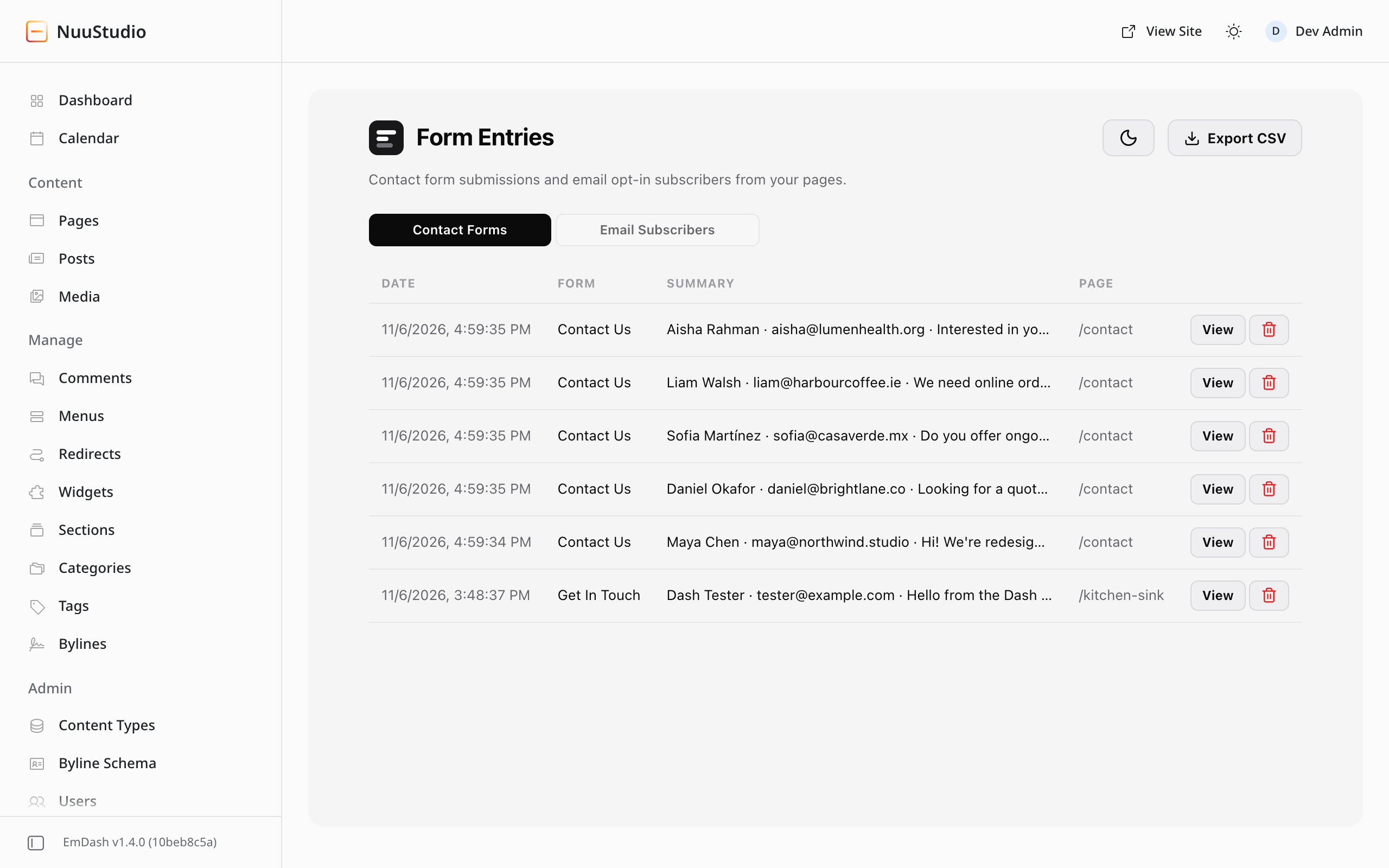
Forms that store and email every entry.

Contact forms with text, email, phone, number, paragraph, dropdown, checkbox and radio fields, each full or half width. Submissions are saved to Form Entries, emailed to you, and protected by a honeypot and an optional math captcha.

Email opt-in forms collect subscribers into named lists. Both export to CSV.

yoursite.com/_emdash/admin
Form Entries screen with recent submissions

Split testing and analytics, built in.

Split testing

Right-click a section, row or module and choose Split Test. Make up to 8 variations, click the element that counts as the goal, and publish. Each visitor gets one variation before the page paints and keeps it. Results show impressions, click, read and conversion rates with a significance verdict, and ending the test keeps the winner.

Analytics without cookies

Page views, visitors, sessions, bounce rate, engagement, sources and UTM tags, devices, countries, scroll depth, clicks, downloads, form conversions and live visitors. No cookies or IP addresses, nothing from bots, logged-in users or browsers that ask not to be tracked. An optional consent banner supports Google Consent Mode.

yoursite.com/_emdash/admin

AI that waits for your yes.

Ask the AI Builder to edit copy, add sections, build a full page or restyle. Copy edits come back as cards with a word-level diff, and uncertain ones start unchecked. Apply what you like in one undo step.

The SEO tab checks meta tags with a search preview, the heading outline, alt text, links, readability and a focus keyword without any AI at all. With a key it can also write meta tags, fix headings and fill in missing alt text.

Works with Anthropic, OpenAI, OpenRouter, Gemini or any OpenAI-compatible endpoint. Your key stays on your server.

Review, comment and edit together.

  • Comments. Press C, click anything, and leave a note with @mentions. Mark it internal or share it with the client.
  • Review links. Clients open the draft and comment without an account.
  • Live collaboration. Avatars, named cursors, "is editing this" notices and follow mode. Edits merge setting by setting.
  • Edit from the site. Signed-in editors can switch on edit mode on the live site and click any element to open it in the builder.
  • Free grammar checker. The MIT-licensed NuuStudio Grammar plugin checks spelling, grammar and style in your browser.
yoursite.com/_emdash/admin

Plays well with your Astro code, and your agents.

Drop a builder layout anywhere in your own templates, keep your theme's header, or let the Theme Builder take over. Each page loads only the CSS and scripts its modules need.

15 MCP tools let AI agents list pages, read and build layouts, edit text, run SEO audits and read split-test results. They stay off until an admin enables agent access, and writes are saved as drafts.

---
import NuuContent from "@nuustudio/emdash/NuuContent.astro";
const { entry } = Astro.props;
---
<MyLayout title={entry.data.title}>
  <NuuContent layout={entry.data.nuu_layout} />
</MyLayout>

Your next EmDash site, built visually.